
Grant applications, program intake and volunteers in one place
Applicants see your eligibility rules before they write a word, upload the documents you need and follow their status online. Your program officers and committee review complete, scored applications.
Where grant rounds lose time
Ineligible applications take as long to read as eligible ones.
Eligibility rules run on the answers first, and ineligible applicants get a clear email instead of a long wait.
Budgets and financial statements arrive in every format, or not at all.
Required documents are named uploads with accepted file types, asked for before the application can be sent.
Scoring spreadsheets passed around the committee.
Scoring rules add points for your criteria and send each application down the right path, and each review is recorded on the application.
Volunteer paperwork and check consents on paper.
Volunteers apply online, accept the background-check consent and sign their agreement.
Grants, programs and volunteers
A community grant application could look like this. Every step is a standard CONSEN step; a nonprofit template is available on request, and we set it up with you.
Grant applications
Each funding round or program as its own offering.
Eligibility rules
Screen out ineligible applications before anyone reads them.
Scoring
Points from the answers, with bands that route applications.
Officer and committee reviews
Review steps in order, with administrator-only decisions.
Program intake
Eligibility, documents and a caseworker review for your programs.
Volunteer onboarding
Details, background-check consent, the check and a signed agreement.
Grant agreements
Signed online and kept as a PDF with the application.
Reports from grantees
Invite funded organizations to a report form, linked by a case reference.
Community grant application
Registration, budget, amount requested and expected outcomes.
Ineligible applications end with an email that says why.
Points for the criteria you set, such as matched funding.
Request changes or more documents.
Reserved for administrators.
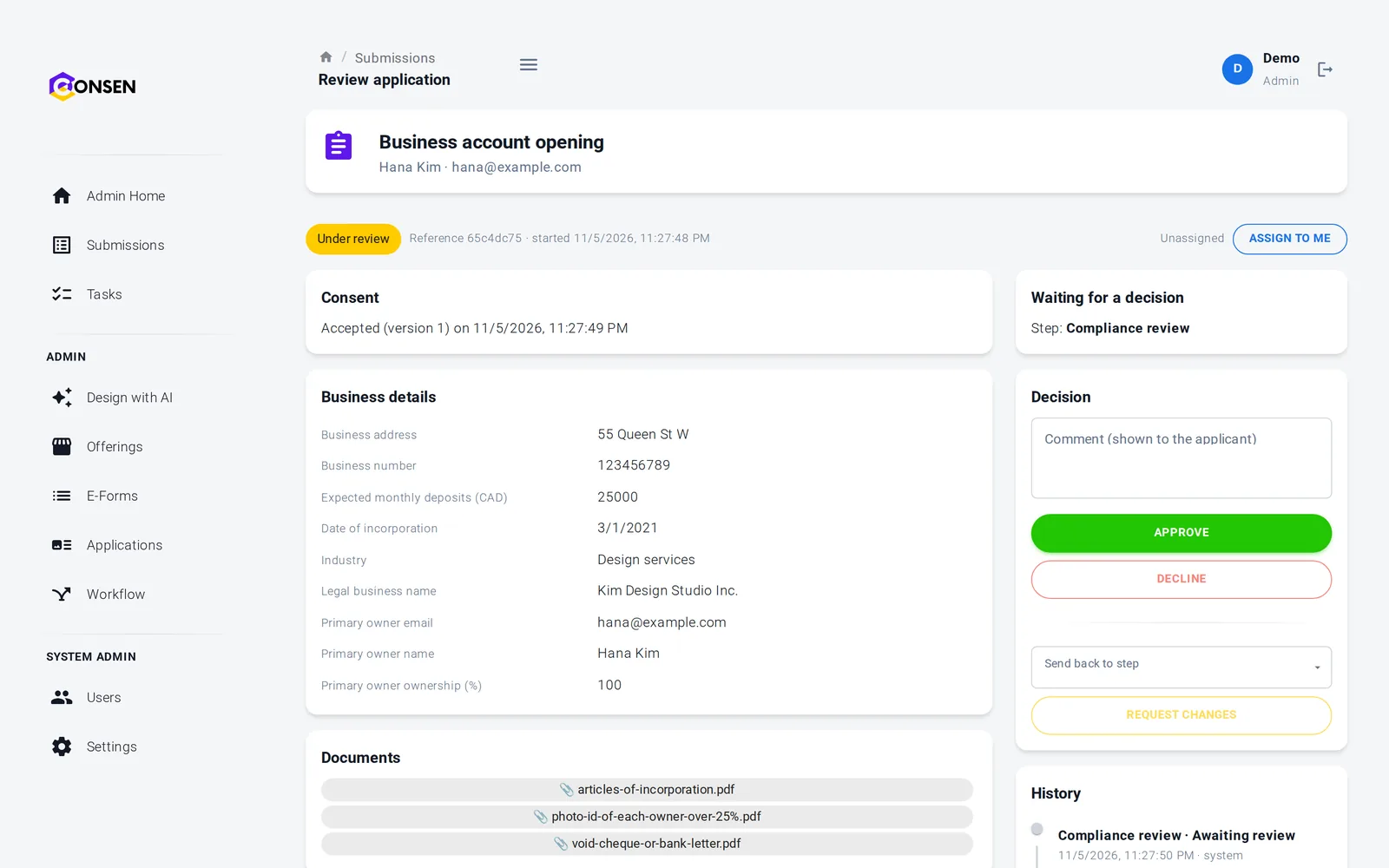
Program officers see complete, scored applications
Answers, documents, the score and the history sit on one page. Officers approve it to the committee, ask for a missing document or send it back for changes, and the committee decides.
A shared queue filtered by round and status
Ask for a missing budget with one comment
Every decision recorded with the person and the time
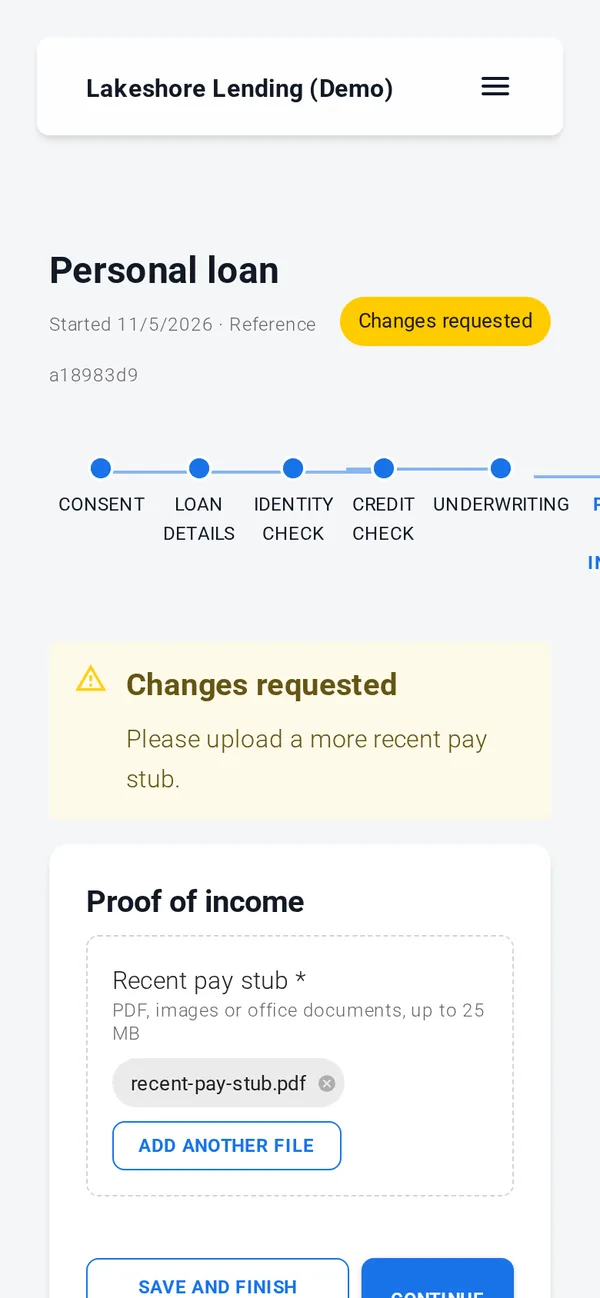
Applicants know where they stand
Link to the application from your website or newsletter. Applicants see each step, save and come back, and follow the status of their application.
Progress through every step is visible
Save and finish later
Apply with an account or a confirmed email address
Consent, documents, simple e-signature, rules, reviews and emails work out of the box. ID verification, credit, background and AML checks, advanced e-signature and payments run through your own provider accounts, connected with our team during onboarding; until then those steps run in test mode with simulated results.
Applicants' and volunteers' data kept private
Each workspace is isolated, data is encrypted in transit and at rest, and only your administrators and reviewers see applications. Built on SOC 2 controls (independent audit planned); GDPR tools built in, DPA on request.
Every staff access to an application is logged
Retention you choose, then automatic deletion
Export and erasure for each application
Consent recorded with time, IP address and version
Questions from nonprofits
On request. A nonprofit template with a grant application, program intake and volunteer onboarding is prepared for your workspace when you need it. Until then, our team sets up your first application with you during onboarding.
Scoring rules can add points from the answers, such as alignment with your priorities or matched funding. Then each review step is completed by one person in order, for example a program officer and then a committee decision reserved for administrators. Reviewers can fill in a structured review record, such as a score and notes, that we set up with you.
Volunteers accept a consent step that records the time, IP address and version of the wording. The check then runs through your own background-check provider, or your reviewers look at a police check the volunteer uploads. Until a provider is connected, the check runs in test mode.
Yes. Disable the offering when the round closes: no new applications can start, and applications already started stay with your team for review and decisions. Enable it again for the next round.
You choose per offering. Organizations can create an account to come back to their application and later reports, or apply without one after confirming their email address.
The questions we hear first
Is our applicants' data safe?
Each workspace is isolated, data is encrypted in transit and at rest, staff access is role-based and invite-only, and every action is in the history.
How we protect dataHow much work is it to set up?
We set up your workspace and build the first application with you during onboarding. After that your team changes forms and rules itself, without code.
See the productDoes it work with our providers and systems?
Built-in steps need no third party. ID, credit and AML checks and payments connect to your own provider accounts. Sending data to your own systems is scoped with you.
Integrations and APIWhat does it cost?
There are three plans. We send a quote after a short call about your process and volume, so you pay for what you need.
Compare plansSee your grant round running on CONSEN
Send us your guidelines and current application form. We will show them as an online application in a demo workspace.