
Invite the right person to the right application
Send a personal link to a specific offering, keep invitation-only offerings hidden from everyone else, set values for each person and group everyone in one deal or household under a case reference.
Where sending forms by email goes wrong
A public form link gets forwarded to people who shouldn't apply.
Invitation-only offerings are hidden, and only the invited email address can start one.
Each client needs a slightly different form or fee.
Administrators set values, such as the fee or scope, for each invitation.
Five people in one deal, five separate threads.
Invite each person with the same case reference. Your staff see their applications together.
No idea who opened the link and who never started.
Each invitation shows sent, opened, started or submitted, with resend and revoke.
Clients, tenants, guarantors and referees
Any offering can take invitations, and an offering can be invitation-only. This is move-out and deposit return from our property management template: current tenants are invited, not found on your website.
Invite to an offering
By email, with a name and a personal message.
Invitation-only offerings
Hidden from your workspace page; only invited addresses can apply.
Values per invitation
Fee, scope or dates set for one person by an administrator.
Case references
Group a deal, claim or household; staff filter and see them together.
With or without an account
The link starts the application, or the person signs in with the invited email.
Invitation tracking
Sent, opened, started and submitted, with resend and revoke.
Reminders and opt-out
For unstarted invitations and unfinished applications.
Invite from your systems
A workspace API key can send invitations with a case reference.
Move-out and deposit return
Forwarding address, move-out date and refund method.
Waits 7 days, or until a reviewer acts.
Every invitation and application in view
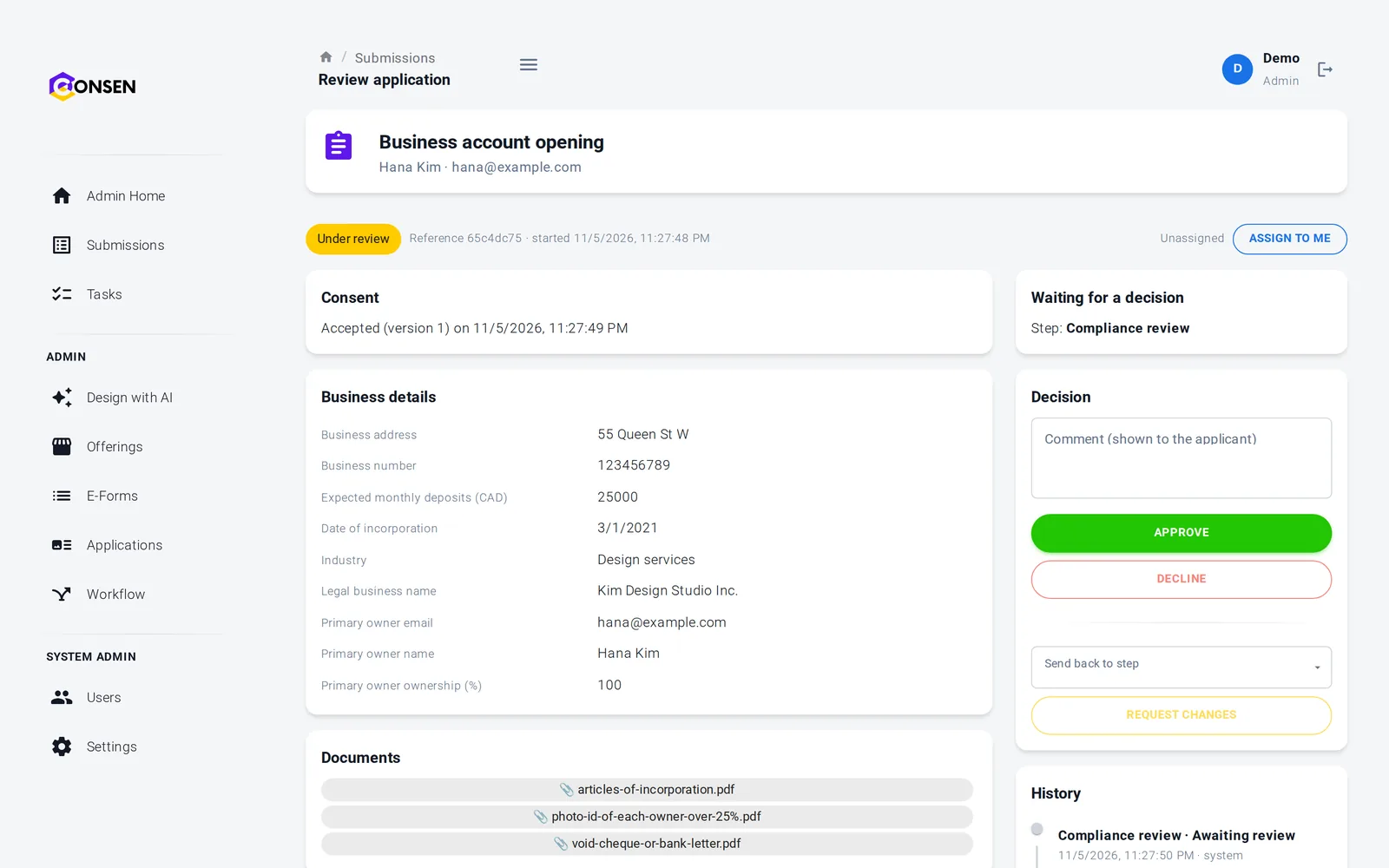
Staff see each invitation's status and the application it led to. Applications with the same case reference are listed together, so a reviewer sees the whole deal or household.
Resend or revoke an invitation
Filter applications by case reference
Dashboard figures for invitations and reminders
One link, straight to the right application
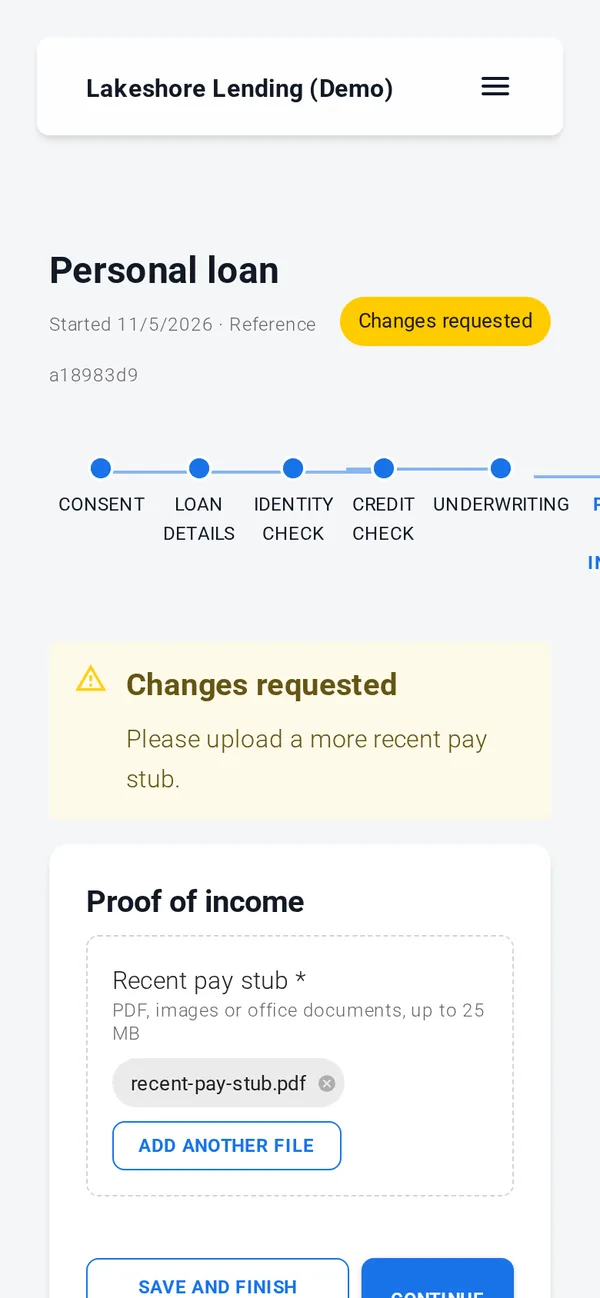
The invited person opens your email and lands on the application, with their name and email filled in. They can save and come back with the same link.
No account needed if the offering allows it
Save and finish later
Opt out of reminders with one click
Consent, documents, simple e-signature, rules, reviews and emails work out of the box. ID verification, credit, background and AML checks, advanced e-signature and payments run through your own provider accounts, connected with our team during onboarding; until then those steps run in test mode with simulated results.
Built to resist misuse
Invitation links are signed and expire after 30 days, staff can't put web links in invitation messages, and sending is rate-limited. Built on SOC 2 controls (independent audit planned); GDPR tools built in, DPA on request.
An opted-out address is never invited again
At most 5 sends per invitation
Every invitation records who sent it
Erasure also clears the invitation
Questions about invitations
Administrators, designers and reviewers can invite a person by email, with an optional name and personal message, to any published offering that isn't private. Only administrators can change the values for one person, such as a fee or scope, and only on invitation-only offerings.
The offering decides. For an offering without accounts, the link starts the application straight away, because it was sent to that email address. For an offering with accounts, the person signs in or creates an account with the invited email, even when public sign-up is turned off.
It groups the applications of one deal, claim or household, such as a borrower and the guarantors, or co-tenants. Each person still has their own application, consent and signature. Applicants never see the reference; your staff can filter by it and see the related applications together.
Reminders go out on the days you choose after the last activity, for invitations not yet started and applications not finished, at most 5 in total and never two within 20 hours. Every reminder has a one-click opt-out, and an address that opted out is never invited again by your workspace.
Yes. A workspace API key with the invitations scope sends invitations, with a case reference, and lists their status. Values per person are set only in the workspace, by an administrator.
The questions we hear first
Is our applicants' data safe?
Each workspace is isolated, data is encrypted in transit and at rest, staff access is role-based and invite-only, and every action is in the history.
How we protect dataHow much work is it to set up?
We set up your workspace and build the first application with you during onboarding. After that your team changes forms and rules itself, without code.
See the productDoes it work with our providers and systems?
Built-in steps need no third party. ID, credit and AML checks and payments connect to your own provider accounts. Sending data to your own systems is scoped with you.
Integrations and APIWhat does it cost?
There are three plans. We send a quote after a short call about your process and volume, so you pay for what you need.
Compare plansSee invitations working on CONSEN
Tell us who you invite today and what each person has to complete. We will show it in a demo workspace.