
Apply your criteria the same way to every application
Eligibility rules, calculations and scoring sort applications as they arrive. Clear cases go straight to the next step; the rest wait in a review queue for the right person, with every decision on record.
Where approvals get inconsistent
Every application read in full, including ones that were never eligible.
Eligibility rules run on the answers first and end ineligible applications with a clear message.
Criteria applied differently by each reviewer.
Scoring adds points for the criteria you set, and bands route each application the same way every time.
Exceptions approved by whoever is around.
Review steps can be reserved for administrators, so policy exceptions go to the right person.
No record of why an application was declined.
Rule outcomes, scores, review records and decisions are kept on each application, with the person and the time.
Eligibility, scoring and review, in one workflow
This is the rental application from our property management template. The income-to-rent ratio is calculated from the unit's rent, scoring applies the criteria, and only files below them go to a separate review instead of being declined automatically.
Eligibility rules
All/any conditions on answers, values and check results.
Calculations
Ratios, totals and counts from answers and offering values.
Scoring bands
Points per criterion; bands route to approve, review or decline.
Review queue
Shared, filtered by offering and status, with claim and assign.
Request changes
Send the applicant back to the exact form or upload, with a comment.
Review records
Structured notes, scores or identification fields your reviewers fill in, set up with our team.
Admin-only decisions
Exceptions and sensitive cases decided by administrators only.
Full history
Every step, rule outcome and decision with the person and the time.
Rental application
Photo ID and pay stubs; ID for every other adult in the unit.
Income at least 3 times the rent +40, credit check passed +30, landlord reference +10. 70 or more meets the criteria.
Files that meet the criteria.
Files below the criteria.
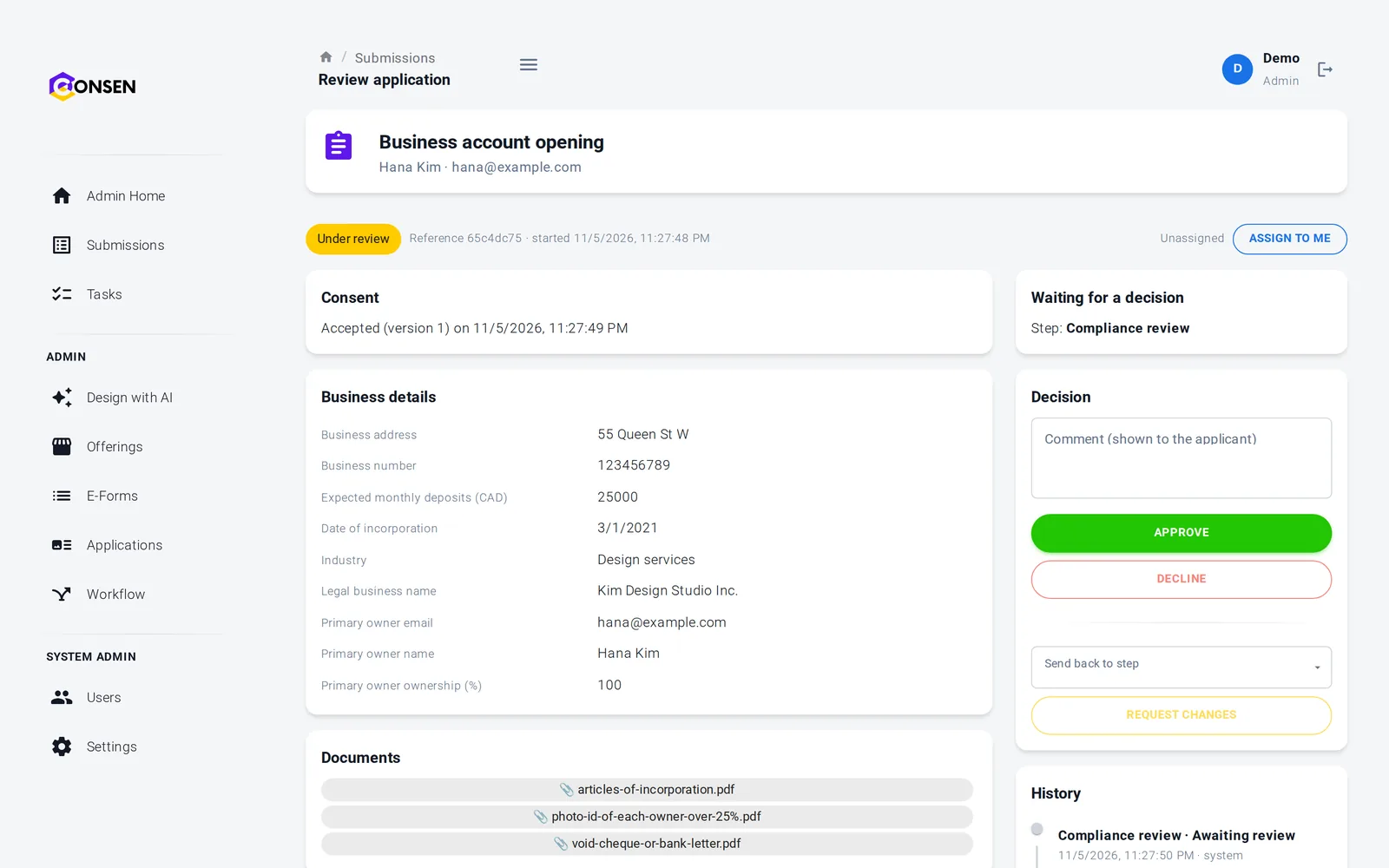
Reviewers decide with the reasons in view
The review page shows the answers, documents, check outcomes, calculated values and the score, so a reviewer can see why an application reached them. They approve, decline, request changes or ask for a document.
Calculated values shown to explain a decision
Instructions for reviewers on each review step
Dashboard with approval rate and time to decision
Applicants get a clear answer sooner
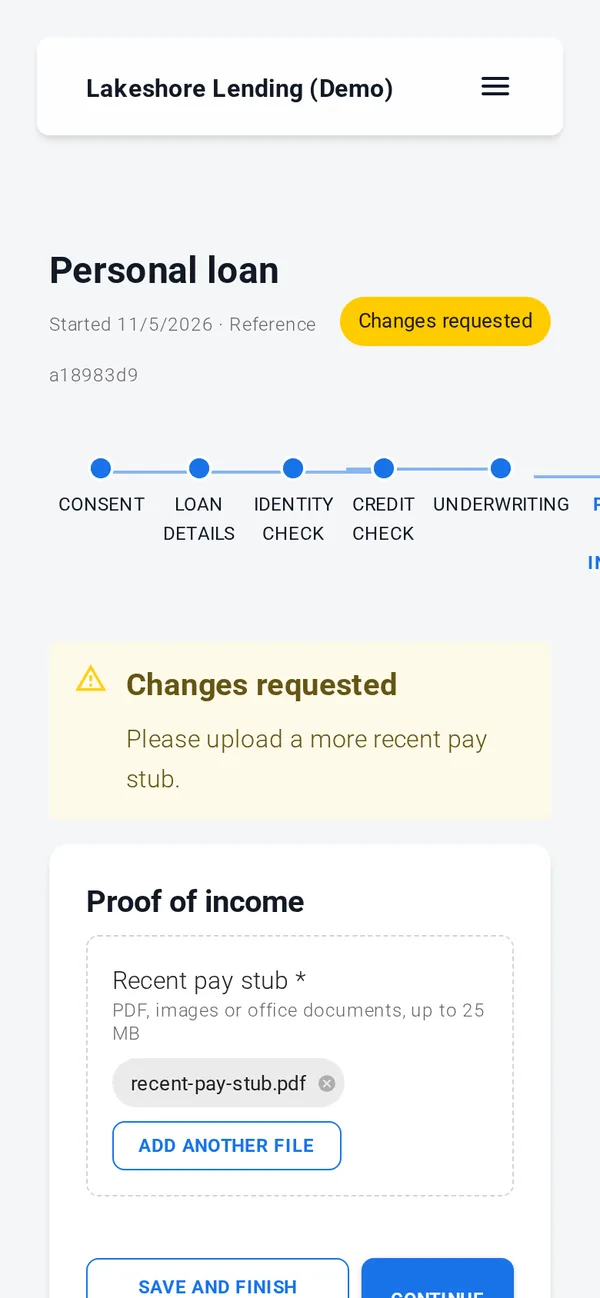
Applicants see their progress and status. If a reviewer needs something, they see the comment and go straight back to that step.
Progress through every step is visible
Changes requested shown with your comment
Save and finish later
Consent, documents, simple e-signature, rules, reviews and emails work out of the box. ID verification, credit, background and AML checks, advanced e-signature and payments run through your own provider accounts, connected with our team during onboarding; until then those steps run in test mode with simulated results.
Rules you can explain
Rules are data the engine reads, never code it runs, and each application keeps the version it started with. Built on SOC 2 controls (independent audit planned); GDPR tools built in, DPA on request.
Workflows checked before publishing so every outcome leads somewhere
Changes never alter applications in progress
Every staff access to an application is logged
Export and erasure for each application
Questions about screening and approvals
Yes, if you want them to. Conditions branch on answers and check results, and scoring adds points and routes each application by band, for example straight to signing, to a reviewer, or to a polite decline. You choose which outcomes need a person.
Yes. Calculations such as income-to-rent or loan-to-value combine answers with values you set on the offering, and rules and scoring can use the result. Calculations are data the engine reads, never code it runs.
Yes. A review step can be limited to administrators, for example for policy exceptions or files below your criteria. Reviewers still see the application but can't decide it.
Nothing. Each application keeps the workflow it started with. Changes apply to applications started after you publish them.
Applications waiting for review appear in a shared queue, filtered by offering and status. A reviewer claims an application or an administrator assigns it, and every decision is recorded with the person and the time.
The questions we hear first
Is our applicants' data safe?
Each workspace is isolated, data is encrypted in transit and at rest, staff access is role-based and invite-only, and every action is in the history.
How we protect dataHow much work is it to set up?
We set up your workspace and build the first application with you during onboarding. After that your team changes forms and rules itself, without code.
See the productDoes it work with our providers and systems?
Built-in steps need no third party. ID, credit and AML checks and payments connect to your own provider accounts. Sending data to your own systems is scoped with you.
Integrations and APIWhat does it cost?
There are three plans. We send a quote after a short call about your process and volume, so you pay for what you need.
Compare plansSee your approval rules running on CONSEN
Tell us your criteria and who decides which cases. We will show them as rules, scoring and review steps in a demo workspace.