
Client onboarding that ends with a signed engagement letter
New clients give their details, upload ID, pass your identity and conflict checks, sign an engagement letter written for them and pay the retainer, all from one invitation.
Where client intake eats billable time
Every new client means a week of emails for ID and paperwork.
One invitation link collects the details, ID and registration documents, checked before they are sent.
Engagement letters are edited by hand for each client.
Write the letter once. Add values such as scope and fee to it and set them for each client when you invite them; the template sets the retainer.
Tax season starts with a list nobody reads.
Clients say what changed this year, and the document list shows only what applies to them.
Conflict checks and acceptance happen in someone's head.
A review step holds the file until your team accepts or declines, and records who decided.
New clients, yearly documents and detail updates
The client onboarding template has three offerings: becoming a client, annual document collection and updating client details. This is the new client engagement.
Client details and ID
Individuals or businesses, with documents asked only when they apply.
Identity and sanctions checks
Through your own providers, with the outcome kept on the file.
Conflict check
A review step your team completes before accepting the client.
Engagement letters
Per-client scope and fee, signed online, kept as a PDF.
Retainers
Taken from the offering's value; waived when it is 0.
Yearly document collection
Only the slips and records that apply to this client's year.
Client detail updates
New address, name or bank details, with proof when needed.
Reminders
Follow-ups for unfinished applications and unopened invitations.
Become a client
Individual or business, contact details and the services requested.
Photo ID, plus business registration only for businesses.
Your letter, with values you can set for each client when you invite them.
The offering's retainer value; an invitation can set its own.
Your own provider · test mode until connectedAccept clients with the whole file in view
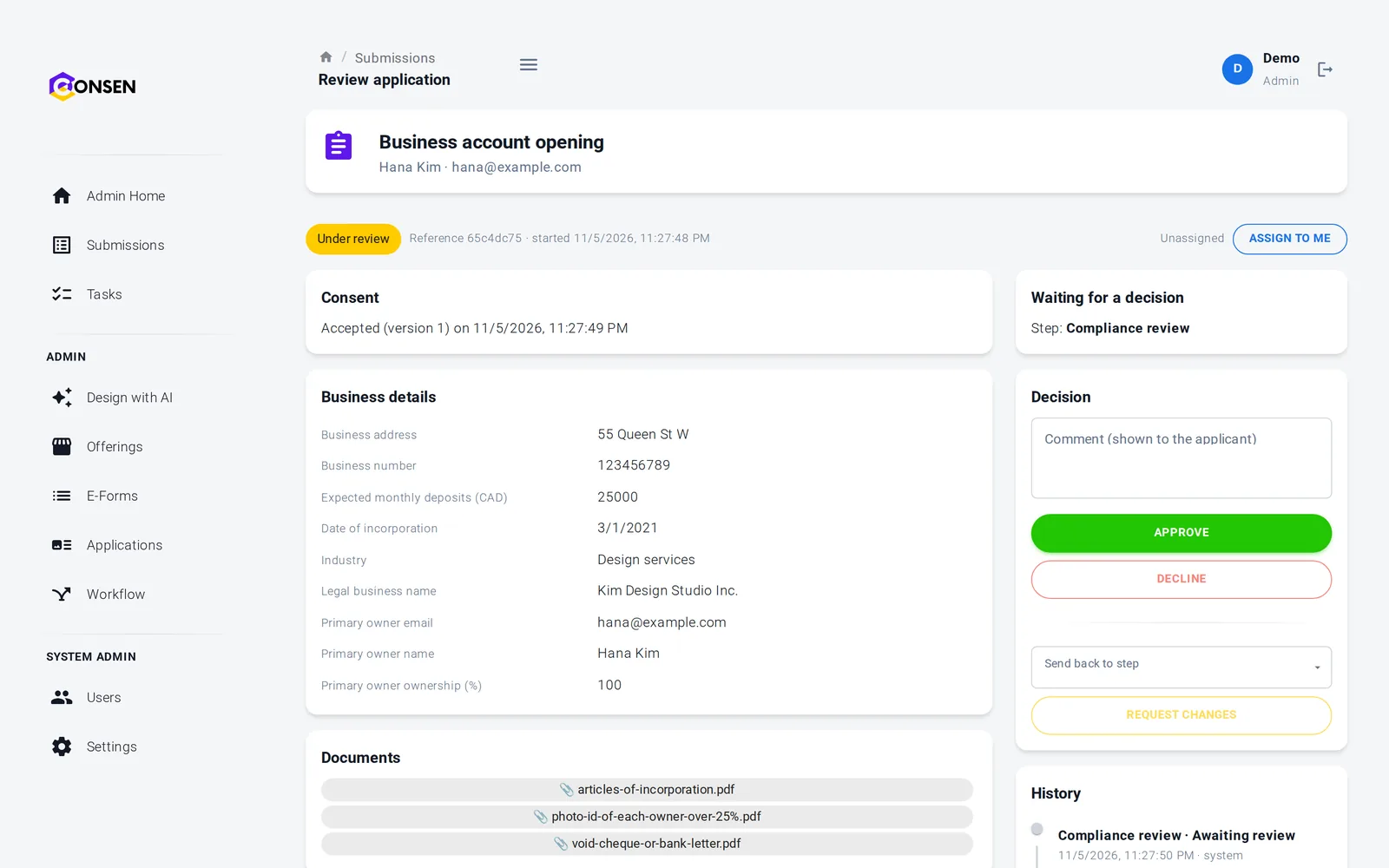
Your team sees the client's details, documents, check outcomes and history on one page, then accepts the engagement, declines it or asks for something missing.
Ask for a missing slip with one comment
Decisions can be reserved for administrators, such as partners
Every decision recorded with the person and the time
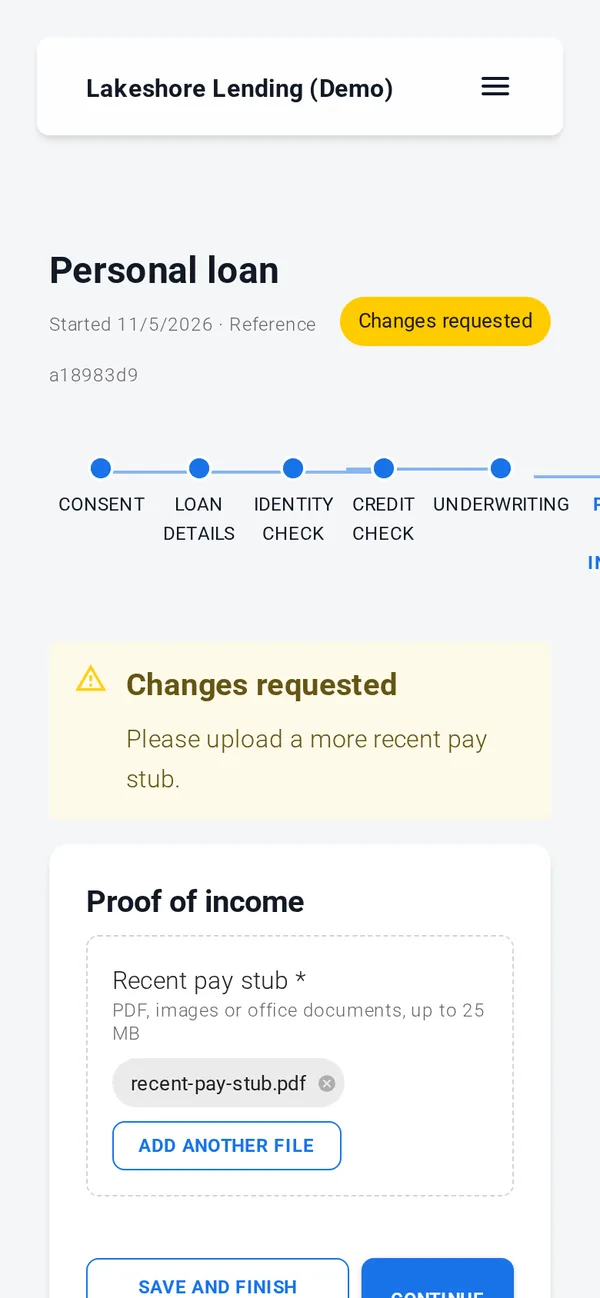
Clients finish onboarding from their phone
Clients open your invitation, see each step and come back later if they need to find a document. Your branding is on every page and email.
Invitation-only offerings
Save and finish later
Clients download their signed engagement letter
Consent, documents, simple e-signature, rules, reviews and emails work out of the box. ID verification, credit, background and AML checks, advanced e-signature and payments run through your own provider accounts, connected with our team during onboarding; until then those steps run in test mode with simulated results.
Client files kept private and on record
Identity documents and signed letters are stored per workspace, encrypted, and seen only by your administrators and reviewers. Built on SOC 2 controls (independent audit planned); GDPR tools built in, DPA on request.
Two-step verification required for staff in the template
Every staff access to a client file is logged
Retention you choose, up to 7 years
Export and erasure for each application
Questions from firms
Yes. Write the letter once with placeholders such as the scope, fee and start date, set as values on the offering. When an administrator invites a client to an invitation-only offering, they can change those values for that client. The letter, the signed PDF and the emails use them, and the client can't change them.
The payment step charges the offering's retainer value through your own payment account, so CONSEN never handles card data. An invitation can set a different retainer for one client, and a value of 0 skips the payment and records it as waived.
After the client's details, documents and checks are in, the application waits at a review step where your team runs its conflict check and accepts or declines the engagement. Declined clients get a neutral email, and the decision is recorded with the person and the time.
No. Clients first tell you what changed this year, such as self-employment income, a rental property or investments sold, and the document list shows only what applies. Your staff can ask for anything missing, and reminders go out on the days you choose, up to 5.
Your firm decides which identification methods you use. CONSEN collects the documents, runs ID verification and sanctions screening through your own providers, and can keep a structured identification record filled in by your staff. The template's checklist asks law firms to check the steps against their law society's rules before publishing.
The questions we hear first
Is our applicants' data safe?
Each workspace is isolated, data is encrypted in transit and at rest, staff access is role-based and invite-only, and every action is in the history.
How we protect dataHow much work is it to set up?
We set up your workspace and build the first application with you during onboarding. After that your team changes forms and rules itself, without code.
See the productDoes it work with our providers and systems?
Built-in steps need no third party. ID, credit and AML checks and payments connect to your own provider accounts. Sending data to your own systems is scoped with you.
Integrations and APIWhat does it cost?
There are three plans. We send a quote after a short call about your process and volume, so you pay for what you need.
Compare plansSee your client onboarding running on CONSEN
Send us your engagement letter and intake checklist. We will show them as an online onboarding in a demo workspace.